Project · Aug 16, 2026
Zain Archviz
Replaced a $17/month Wix site with a focused portfolio built on Next.js, Decap CMS, and Netlify, while keeping the client's publishing workflow familiar.
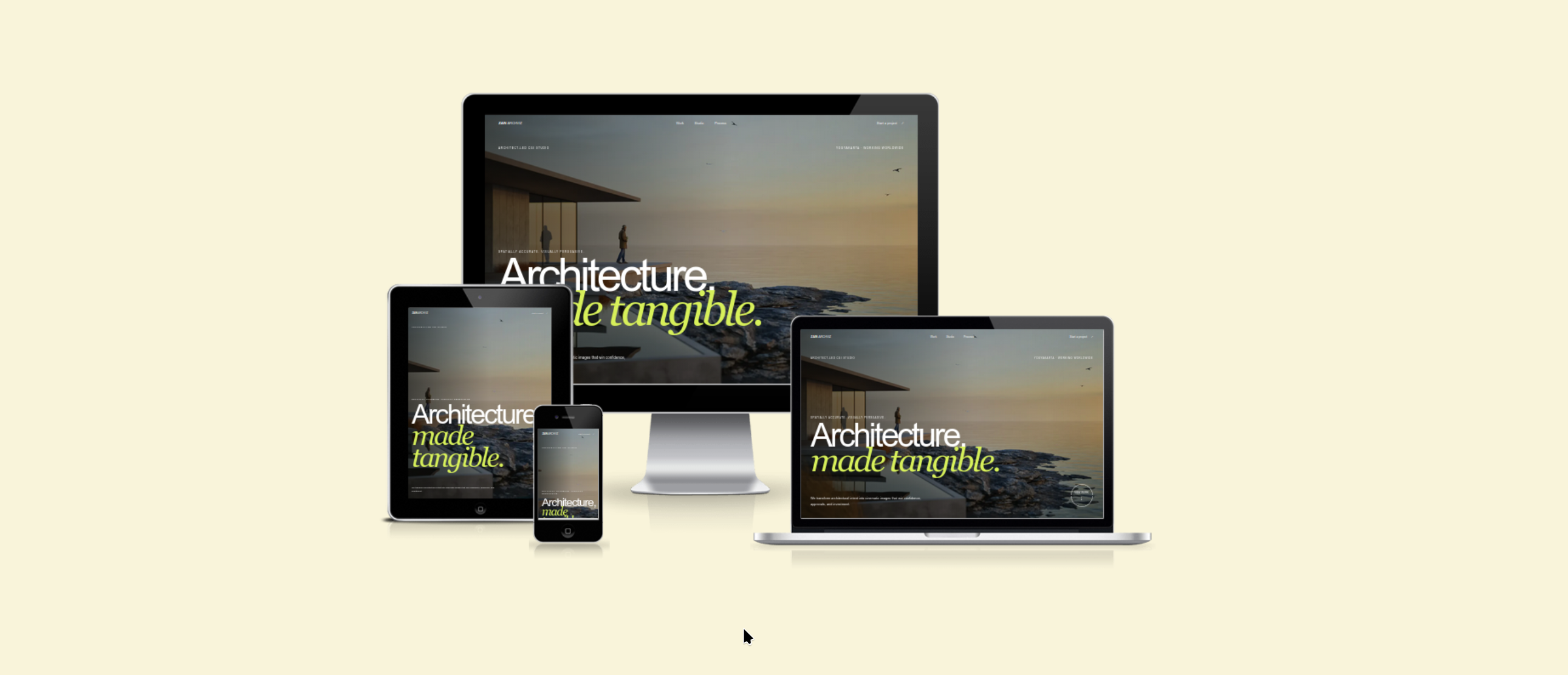
Zain Archviz is a portfolio I built for an architect-led 3D visualization and CGI studio in Yogyakarta. The site gives the studio a focused place to publish project images and films and gives prospective clients a clear way to explore the work and make an inquiry.
The site is live at zainarchviz.com and supports the studio's remote work with clients worldwide.
Replacing the Wix Portfolio
I already knew the client's work and asked where his existing website was hosted. He told me it was running on Wix for $17 per month.
After reviewing the site and discussing how he used it, I learned that he mainly needed a professional place to present his experience and project portfolio. Most of the additional features in a large hosted website builder did not help him do that work.
My first proposal was to store the content in Markdown files. I assumed Markdown would be simple enough for the client to maintain, but I was wrong: he had never used it. What he wanted was the workflow he already understood from Wix: open the site editor, add a project, upload media, and publish.
I researched static CMS options and chose Decap CMS. It keeps the content in Markdown without requiring the client to edit files, and it does not introduce a database. I also wanted the editing interface to stay narrow. Giving a nontechnical user more features can create more decisions and more ways to get stuck, so the CMS focuses on the project content he actually needs to manage.
Designing the Publishing Workflow
Reducing the hosting cost was only useful if the client could continue publishing without me. The new editor therefore supports homepage copy, project descriptions, images, films, SEO fields, and the ordering of gallery items.
From the client's perspective, publishing has not changed much: he opens an editor, adds the project content and images, and publishes. The difference is that the interface is dedicated to his portfolio instead of surrounding him with unrelated website-builder features. Behind the editor, every update remains portable and versioned in Git as Markdown, JSON, and media files.
Supporting Images and YouTube Films
The old Wix site was intended to show both images and project films, but only the images were successfully published. Uploading video was constrained by the available storage, and the existing setup did not provide a practical way to use a third-party video link.
I noticed that the client already uploaded project films to YouTube for his Upwork profile, so I proposed using the same workflow for the website. He uploads each film to YouTube and pastes its link into the project editor; the site then places it in the ordered gallery alongside the images.
This avoids building and paying for our own video storage and delivery. It also gives each film a presence on YouTube, where it can be discovered independently through YouTube and Google Search.
Building with Next.js and Decap CMS
The application uses the Next.js 15 App Router, React 19, and TypeScript. Server components read the Git-backed content directly, using gray-matter for project frontmatter and marked for project stories.
The content system includes:
- CMS-managed homepage, studio, process, contact, and SEO content.
- Project entries with descriptions, dates, featured images, and optional stories.
- Ordered galleries that can mix architectural images with YouTube films.
- Legacy gallery compatibility so existing project content continues to render.
- Automatic static routes for every published project.
Where This Approach Works Well
- Low recurring cost. The code and content live in Git, while Netlify builds and serves the static site. For this project, that removes the recurring hosting bill and leaves the domain renewal as the only website cost.
- A focused publishing workflow. The client uses a small editor built around the fields he needs instead of working directly with Markdown or navigating a general-purpose website builder.
- Full control over the site. Because I own the application code, I can change the layout, content model, SEO output, and publishing behavior without waiting for a hosted builder to support them.
- Replaceable media behavior. Decap CMS manages the content input, but it does not dictate how the frontend renders it. I can override a widget or change how images are processed and optimized independently.
- Portable, versioned content. Projects and media remain in the repository, so changes have a history and the content is not tied to a database or a proprietary page format.
Where the Static Workflow Slows Down
- Every content change requires a deployment. Publishing a new project creates a commit and triggers a full site build. This is acceptable for a portfolio that changes occasionally, but it is slower than updating content from a database at request time.
- New image previews are not immediate. An uploaded image needs to be committed and processed by the deployment before its public preview becomes available. There is a short delay between pressing publish and seeing the final image on the live site.
- The repository grows with the gallery. Keeping media in Git makes it portable and versioned, but a growing collection of high-resolution architectural images will also increase the repository size. External asset storage may become necessary later.
- Free hosting still has a ceiling. The current setup avoids a hosting charge, but free hosting plans have usage and build limits. Higher traffic or more frequent publishing could eventually require a paid plan or a different deployment setup.
Search, URL Migration, and Domain Launch
Search and Sharing
Each project produces its own canonical metadata, Open Graph and Twitter preview, and VisualArtwork structured data. The application also generates sitemap and robots routes, helping search engines understand both the studio and individual visualization projects.
Preserving Existing URLs
Migrating the existing Wix URLs requires additional care. Old project URLs need to map to their replacements so that saved links and search results do not end at a missing page. Because the client is moving projects gradually, the duration of this work depends on how quickly he republishes the existing content on the new site. I continue to support the migration by fixing current 404s and adding the corresponding redirect whenever the client sends me a newly published project URL.
Configuring the Domain
The most challenging part of the launch was not the application code. At first I did not have access to the client's domain manager, so I had to write DNS instructions and guide a nontechnical user through the configuration. That communication was difficult for both of us. The client later gave me access to the domain manager, and I was able to complete and verify the configuration directly.
Saving $204 Per Year
The finished site runs on Netlify and leaves the domain renewal as its only recurring website cost. The previous Wix charge was $17 every month, so the migration saves the client a real $204 per year while preserving a familiar publishing workflow.
Under the hood
Key technical highlights
- Removed the real $17 monthly Wix hosting charge, saving the client $204 per year
- Replaced an initial Markdown-only plan with a focused Decap CMS workflow the client could use without technical knowledge
- Moved project films to YouTube embeds after Wix storage limits prevented the client from publishing video
- Launched the custom domain after working through DNS access and migration with a nontechnical client